 games.org.es

Popular Games
Last Played


Dice Puzzle: Fruits!
1 plays









































Dice Puzzle: Fruits!
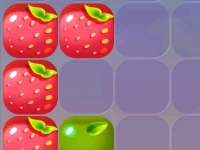
Get ready to challenge your strategic thinking with Puzzle Games like Dice Puzzle: Fruits! This addictive game is a thrilling combination of luck and skill, where you aim to create the largest possible fruit by tossing and connecting identical ones on the playing field. The game's difficulty level is surprisingly hard, making it a great test of your problem-solving skills.
How To Play Dice Puzzle: Fruits!
Playing Dice Puzzle: Fruits! is easy and fun. Simply toss fruits onto the field, and then slide matching identical ones together to raise your score. The goal is to connect as many identical fruits as possible to earn points.
Controls and Features
Gameplay involves tossing fruits and matching identical ones to connect them on the playing field. This may seem simple, but the game's difficulty is noted as harder than it looks. You'll need to plan your moves carefully to achieve the highest score.
Tips
Plan ahead and move slowly to think through your fruit connections. Focus on matching identical fruits to create larger combinations and earn more points.
FAQ
What are the controls?
Toss fruits and slide them together to match identical ones.
What is the objective of Dice Puzzle: Fruits?
The main objective is to connect identical fruits on the playing field to earn points.
What makes Dice Puzzle: Fruits! difficult?
The game's difficulty is noted as harder than it looks, making it a challenging test of your strategic thinking.
How do I progress in Dice Puzzle: Fruits!
Progress by matching identical fruits and creating larger combinations to earn more points and raise your score.
About this game
- Supported devices
- Desktop
- Genre
- Puzzle Games
- Release date
- 06 March 2025
- Latest update
- 06 March 2025
- Rating
- No ratings yet